Amazon / Education / AR DRAWING - GIRLY TRACE & SKETCH
REVIEW
AR Drawing turns a Fire tablet into a tracing window, and not much else.
A camera-overlay tracing app aimed at kids who want to draw cute subjects from a pre-loaded gallery — useful for the half-hour it takes to learn what it does, light on everything past that.
BY THE APP COMRADE DESK · MAY 11, 2026 · 3 MIN READ

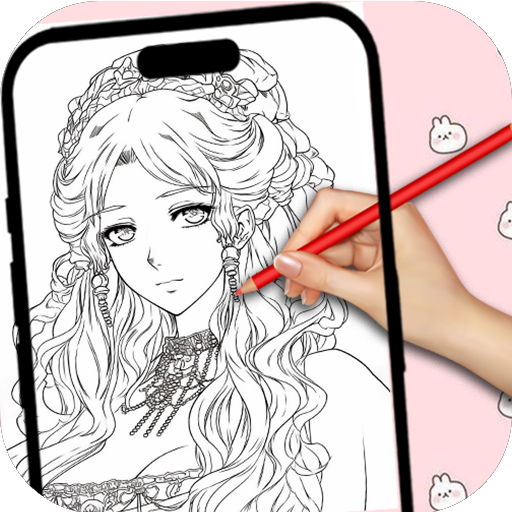
AR Drawing - Girly Trace & Sketch
SOFIWALL STUDIO
OUR SCORE
6.0
AMAZON
★ 5.0
PRICE
$4.99


There is a small genre of apps on Android and Fire OS whose whole pitch is: hold your tablet over a piece of paper, and you’ll see a drawing floating on the page that you can trace with a real pencil. AR Drawing - Girly Trace & Sketch is one of those apps, narrowed to a specific audience — kids who want to draw flowers, hearts, princesses, and cartoon animals — and sold once for $4.99 instead of behind ad walls and gem purchases.
For what it is, it works. The camera overlay is steady enough on a propped-up Fire tablet, the opacity control is the right one to make prominent, and a child can use it without supervision after about ninety seconds of demonstration.
What it isn’t is a creative tool. The image library is finite and stylistically narrow, custom imports aren’t supported, and the moment the kid wants to trace something the app doesn’t already have, you’re out of options. It’s a clever party trick built on a phone-grade camera, asked to do a craft-table job — and the trick is more than $4.99 of fun, but not by a lot.
It's a clever party trick built on a phone-grade camera, asked to do a craft-table job.
FEATURES
AR Drawing - Girly Trace & Sketch is a camera-overlay tracing tool. Pick an image from the in-app gallery — flowers, hearts, princess-style cartoons, animals, lettering — pin the Fire tablet over a sheet of paper, and the camera feed shows a translucent version of that image floating on top of the page. You trace what you see with a real pencil. The app itself never touches the paper.
Sofiwall Studio's build is a one-screen affair. A grid of categories runs across the top, a preview pane in the middle, and three controls underneath: opacity, lock position, and a flip toggle so left-handers don't have to work around their drawing hand. There's no freehand canvas, no digital paint, no save-as-PSD layer export. It's a viewfinder for paper artists.
It ships paid at $4.99 with no in-app purchases. The library is finite — a couple of hundred line-art images grouped into the "girly" theme set the title promises, plus a handful of generic flower and animal sheets.
MISSION ACCOMPLISHED
The core mechanic works. Brace the tablet on a stand or stack of books, dim the room a little so the screen doesn't reflect, and the camera overlay is legible enough for a six-year-old to follow without an adult re-explaining what they're looking at. The opacity slider is the right control to expose first — younger kids want the image bold, older ones want it ghosted so the pencil work shows.
Pricing is honest. $4.99 once, no subscriptions, no ad insertions interrupting the trace, no upsell pop-ups asking the kid for a parent's password. For a category that on Google Play is largely ad-supported freeware with a paid-tier upsell every fourth tap, paying once and being done is a real differentiator.
ROOM TO IMPROVE
The gallery is small and stylistically narrow. "Girly" here means a pink-and-pastel selection of cartoon faces, hearts, bows, and Disney-adjacent princesses — fine if that's what the kid asked for, frustrating if she wants a horse or a dinosaur or her own photo. There's no way to import a custom image, which is the single feature that would lift this app out of its niche; competing AR-trace apps on Android let you load any photo from the gallery and turn it into a trace template, and that one capability is what makes the genre useful past month one.
Camera tracking is the other limit. The overlay drifts if the tablet shifts even slightly, the lock-position toggle helps but doesn't anchor as cleanly as a true AR plane-detection implementation would, and on a Fire HD 8 the camera resolution makes fine detail (eyelashes, lettering serifs) blur into suggestion rather than guide. The app doesn't pretend to be more than it is, but on cheaper Fire hardware its ceiling drops noticeably.
CONCLUSION
Buy it for a kid who specifically wants to draw the kind of subjects in the title — it'll deliver a quiet weekend of paper-and-pencil time without ads or pestering. Skip it if you want anything resembling a digital art tool, or if the child in question would rather trace her own photos. The next version that adds custom-image import is the one worth recommending without hedging.